Workspace Knowledge & Memory
Locus has two local knowledge systems with different jobs:
| System | Purpose | Stored data |
|---|---|---|
| Workspace Search Index | Find relevant material in project files. | Eligible file chunks, paths, line ranges, hashes, FTS5 terms, and optional local vectors. |
| Durable Memory 2.0 | Carry approved preferences, facts, decisions, procedures, and relationships into future work. | Encrypted memory payloads, review state, scope, provenance, confidence, validity, and optional encrypted vectors. |
Indexing a file does not turn it into memory. A memory suggestion is not recallable until you approve it.
The user-facing memory flow
- Agent suggests. A clear preference, fact, decision, procedure, or relationship enters the Inbox as a candidate.
- You review. Approve, edit, reject, keep both sides of a conflict, or replace an older item.
- Relevant recall. Only approved, eligible memories can be retrieved. Locus explains why each item matched.
Candidates expire after 30 days if they are not approved. This keeps transient suggestions from accumulating indefinitely.
Memory owner and scope
The Memory owner picker changes which agent-scoped memories you are viewing and editing. Personal and workspace memory are shared independently of that selection.
| Scope | Boundary |
|---|---|
| Personal | Available across workspaces for this local user. |
| Workspace | Bound to the canonical workspace. |
| Agent | Bound to the selected team member or primary agent. |
Memory kinds are preference, fact, decision, procedure, and relationship. Each item can also carry tags, confidence, provenance, a source session/run, valid-from and valid-until dates, a pin, stale state, last-used time, use count, revision, and conflict/supersession links.
Advanced Memory Settings
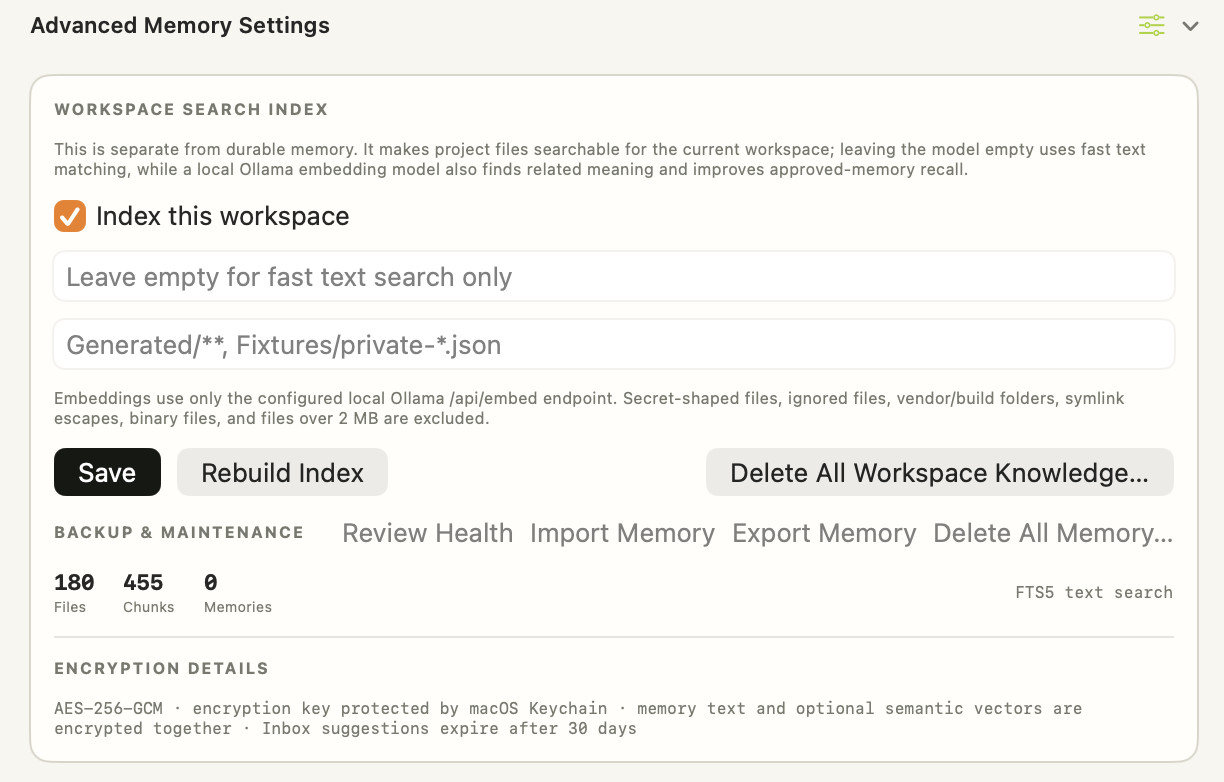
The screenshot shows a populated search index and an empty approved-memory set:
- 180 Files means 180 eligible project files are represented in the index.
- 455 Chunks means those files produced 455 searchable text segments.
- 0 Memories means no approved durable memory is currently visible for the active workspace and selected memory owner.
- FTS5 text search means the embedding model field is empty, so retrieval is lexical only.
The memory count is separate from the file and chunk counts. It also does not show how many candidates are waiting in the Inbox.
Workspace Search Index
The index is isolated by canonical workspace and stored locally in SQLite.
| Control | Detailed behavior |
|---|---|
| Index this workspace | Enables project-file indexing for the current workspace. |
| Optional local Ollama embedding model | Leave empty for fast FTS5 lexical search. Enter a local model to add meaning-based vector similarity and improve approved-memory semantic recall. |
| Additional exclusions | Comma-separated globs such as Generated/** or Fixtures/private-*.json. |
| Save | Stores enabled state, model, local Ollama host, and exclusion rules. |
| Rebuild Index | Reprocesses eligible files; use it after changing the embedding model or exclusions. |
| Delete All Workspace Knowledge | After confirmation, deletes the project index and workspace-scoped candidate and approved memory. It does not remove project files or chat transcripts. |
Indexing follows Git ignore rules and uses content hashes for incremental updates. It refuses symlinks and paths that escape the canonical workspace, and skips hidden, vendor, build, binary, and oversized files.
The following never enter the index:
- Files matching Git ignore rules or your extra exclusion globs.
- Secret-shaped filenames and common key, certificate, and environment-secret names.
- Vendor/build folders and hidden paths.
- Binary files and files over 2 MB.
- Symlinks or path escapes.
If an embedding model is configured, text is sent only to the configured loopback Ollama /api/embed endpoint. If semantic embedding fails, FTS5 lexical search remains available.
Search results include relative paths, line ranges, freshness, and source type. They are evidence, not instructions: project text cannot change system instructions, permissions, or team membership.
How Memory 2.0 recall works
Recall first selects approved items in the active personal, workspace, and selected-agent scopes. Items whose valid-from date is in the future are skipped.
Eligible items are ranked using:
- Exact phrase matches.
- Matching terms.
- Optional local semantic similarity.
- A boost for pinned items.
- Confidence.
- Recency.
Expired items are strongly down-ranked and stale items are down-ranked further. Weak matches are filtered out. Returned items include a recall explanation such as exact phrase, 3 matching terms, semantic similarity 78%, pinned, and 90% confidence. Recalled items update their last-used time and use count.
Conflicts and replacement
Locus surfaces same-topic alternatives instead of silently overwriting them.
- Keep Both approves the new item and preserves the older conflicting item.
- Replace Older approves the new item, records which IDs it supersedes, marks the older conflicts stale, and links each older item back to the replacement.
Feedback can be marked helpful, ignored, or incorrect. Incorrect feedback marks the memory stale so it is much less likely to be recalled.
Backup and maintenance
| Action | What it changes | What remains |
|---|---|---|
| Review Health | Marks expired approved memories stale and reports conflicts for review. | Index, files, chats, and non-expired memory. |
| Import Memory | Adds validated memories from a Locus Memory JSON export. | Existing index and source project. |
| Export Memory | Writes a deliberately readable JSON copy to your chosen file. | Encrypted local vault remains unchanged. |
| Delete All Workspace Knowledge | Deletes the workspace index and workspace-scoped candidate/approved memory. | Project files, chats, personal memory, and agent memory. |
| Delete All Memory | Deletes visible personal, workspace, and selected-agent candidate/approved memory. | Project index, project files, and chats. |
Memory export is readable text by design. Store the exported JSON like any other sensitive document. Deletion cannot be undone unless you exported memory first.
Encryption details
Memory content and optional semantic vectors are encrypted with AES-256-GCM. The backend's memory key is stored in its local memory/master.key file with user-only access; it is not protected by a separate per-application Keychain prompt. Continuity uses the backend memory encryption key.
Treat the local application profile and backups as private data. Memory export deliberately writes readable JSON. The separate Identity Vault uses its own edition-specific Keychain key.
Recommended defaults
- Start with FTS5 text search, an empty embedding-model field, and telemetry off.
- Add a small local embedding model when meaning-based retrieval is worth the local compute.
- Exclude generated artifacts, private fixtures, and any project-specific sensitive paths.
- Approve durable decisions and conventions; reject transient task details.
- Run Review Health periodically if you use validity dates or keep many related decisions.